

Products
Solutions
Ecosystems
Resources
Partners
June 2026: Smarter Cost Control, Governed AI Access, and Richer Mosaic Modeling
Quick Answer
June 2026 brings smarter cloud cost visibility across Snowflake and Databricks analytics assets. Sentinel Cost Intelligence attributes platform spend back to governed assets and surfaces AI-powered optimization recommendations daily.
Flexible joins and custom calendars let Mosaic models reflect how the business actually operates. Teams can now show entities with missing activity and align time dimensions to fiscal, retail, or academic calendars without manual workarounds.
Governed AI access, reusable agent prompts, and MCP support extend trusted context to AI tools. MCP-compatible applications can query MTDI and Intelligent Cubes through the Mosaic endpoint with existing security policies automatically applied.
The June release makes the universal semantic layer more operational. It is no longer just where trusted metrics are defined. It is where teams see what analytics costs to run, model the business as it actually works, and deliver trusted context to people and AI agents wherever decisions happen.
Cost Control, Complete Analysis, and Governed AI Access
As analytics and AI usage grow, organizations need more than access to data. They need visibility into what trusted analytics costs to run, confidence that analysis reflects the full business population, and a governed way to extend business context into AI tools. This release addresses all three through Sentinel Cost Intelligence, flexible join behavior, reusable agent setup, and Model Context Protocol support for existing analytical assets.
AI-Powered Cost Intelligence Across Data Platforms
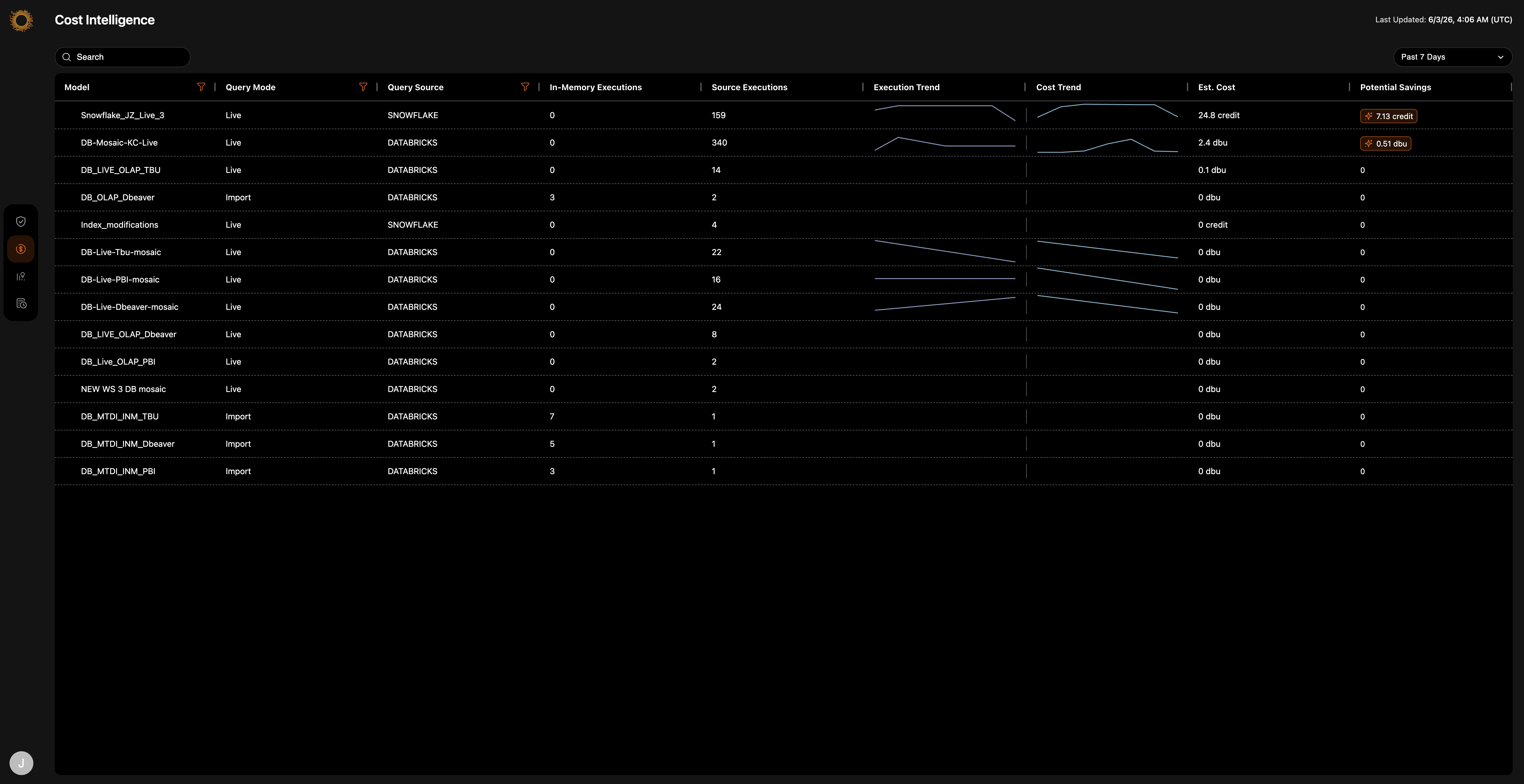
Cloud data costs can grow quickly when teams cannot see which models, datasets, queries, and usage patterns are driving spend. Sentinel Cost Intelligence helps close that visibility gap by attributing data platform costs back to the governed analytics assets behind the work, starting with Snowflake and Databricks.
Administrators can connect a billing source in Workstation, then Sentinel applies query tagging, attributes spend at the dataset level, and refreshes cost insights daily. A dedicated Cost Intelligence view highlights top cost drivers and surfaces AI-powered recommendations, such as unloading inactive datasets, tuning refresh cadences, or switching between live and in-memory modes when usage patterns justify it.
For data and analytics teams, that means clearer cost accountability, fewer idle or over-refreshed assets, and more confident decisions about when and where to optimize cloud spend.
Flexible Joins Across Mosaic Models and Schema
Standard joins can exclude records when matching fact or lookup data is missing. For many analytical questions, that can produce incomplete or misleading results. A customer with no orders this quarter still exists. A store with no transactions last month is still part of a regional report. A borrower with no current activity is still in a portfolio.
Modelers can now define attribute-level join behavior in Mosaic Models and Mosaic Schema, formerly Project Schema, selecting from four options: matched records only, all lookup values, all fact or relationship records, or all records regardless of match. This makes it easier to show customers, stores, borrowers, or other business entities even when related activity is missing, handle null-heavy datasets more cleanly, and build analysis around the actual business question rather than the default shape of the underlying data.
The result is more complete analysis by design: reports reflect the full business population, not just the records with matching fact data.

Reusable Context and Prompts for Smarter Agents
A new agent should not require teams to recreate the same column descriptions, instructions, and prompt patterns from scratch. As organizations deploy more agents across business domains, reuse becomes a governance and consistency issue, not just a productivity issue.
Strategy Agents are now faster to build and easier to standardize. Creators can import and export column descriptions and custom instructions, then use a prompt library to add up to 25 reusable prompts for common business questions. For business users, that means faster access to recurring analytical questions, more consistent answers across agents, and better handling of complex queries through multiple reasoning paths before the agent responds.
MCP Support for MTDI and Intelligent Cubes
Without governed semantic access, AI agents fall back on raw schemas: data without the business logic, access controls, and consistent definitions that make analytics reliable. Earlier this year, Model Context Protocol, or MCP, support gave AI tools access to Mosaic model semantics. This release extends that reach to Multi-Table Data Import, or MTDI, and Intelligent Cubes, including the in-memory and live analytical assets that power many of the analytics workflows organizations have already built.
MCP-compatible AI applications can now discover available projects and cubes, retrieve semantic descriptions, and run semantic queries against in-memory and live analytical data through the Mosaic endpoint, with existing security policies and audit controls applied. No raw schema exposure. Less custom integration work for each AI tool.
That means organizations extending AI workflows into operational analytics can use governed data assets they already own, without rebuilding the semantic layer for each new AI tool that gets deployed.
Greater Control Across the Mosaic Modeling Lifecycle
This release gives teams more control over how Mosaic models are created, governed, and consumed. Data teams can configure AI-assisted modeling behaviors, align calendars to real business cycles, and expose clearer column names to downstream tools and AI applications.
Granular Controls for Mosaic AI Auto Modeling
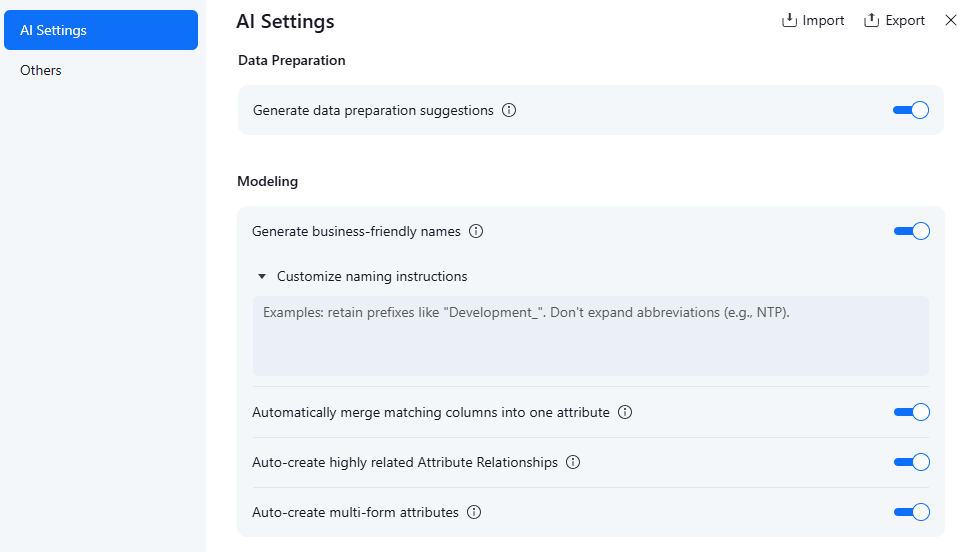
Auto modeling in Mosaic accelerates the modeling process by automatically linking attributes, merging matching columns, and creating multi-form attributes. For most teams, that acceleration is valuable. For teams in regulated industries or environments with strict governance requirements, unexpected automated links or merges can introduce risk.
Data teams can now turn specific auto modeling behaviors on or off at the model level: AI naming, automatic attribute linking, automatic column merging, and auto-creation of multi-form attributes. Original column names can be preserved. AI-generated suggestions remain available for manual review and selective application rather than being applied automatically. These controls are clearly documented and auditable.
That gives data teams the benefits of AI-assisted modeling without giving up the governance predictability that production environments require.
Custom Calendars with Flexible Week and Year Support
Most analytics platforms assume a January-to-December calendar. Many enterprises do not use one. Retailers use 4-4-5 calendars. Financial services firms close their quarters in March, June, September, or October. Academic institutions run on September-to-August cycles. Aligning Mosaic time dimensions to those cycles previously required manual workarounds and ongoing maintenance.
Teams can upload a CSV defining the dates, weeks, months, quarters, and years that match the organization's actual calendar. Mosaic validates the structure, ensures periods are consecutive, and automatically creates familiar time attributes with ISO-style display formats. Reports and dashboards built on those models reflect the calendar the business actually uses.
That reduces calendar workarounds and gives teams more time to focus on analysis instead of maintaining date logic outside the model.
Custom Column Naming for Mosaic Models in the Universal Semantic Layer
As MCP clients, Power BI, and SQL tools connect to Mosaic through the Universal Semantic Layer, the column names they see determine how useful that connection is. Auto-generated or source-system column names create friction for AI agents and downstream analysts who expect business-friendly labels.
Modelers can now define column naming conventions at the Mosaic model level. Attribute forms and metrics can use aliases from the underlying data source as their USL column names, with intelligent fallbacks when aliases are blank or unsuitable. Existing integrations are preserved while new and AI-facing consumers see cleaner, more descriptive labels.
MCP clients and connected AI tools see the column names the business intends, not whatever the source system happened to use. Cleaner labels give AI tools clearer business context and reduce confusion for analysts working downstream.
Streamline BI Administration, Reporting, and Delivery
BI teams need to manage environments, modernize administration, build business-ready reporting, and deliver trusted analytics into the tools users already rely on. This release improves that workflow across Workstation Web, Python automation, tenant isolation, Financial Row Sets, Personal Views in Library, and Google Drive delivery.
Browser-Based Administration with Workstation Web
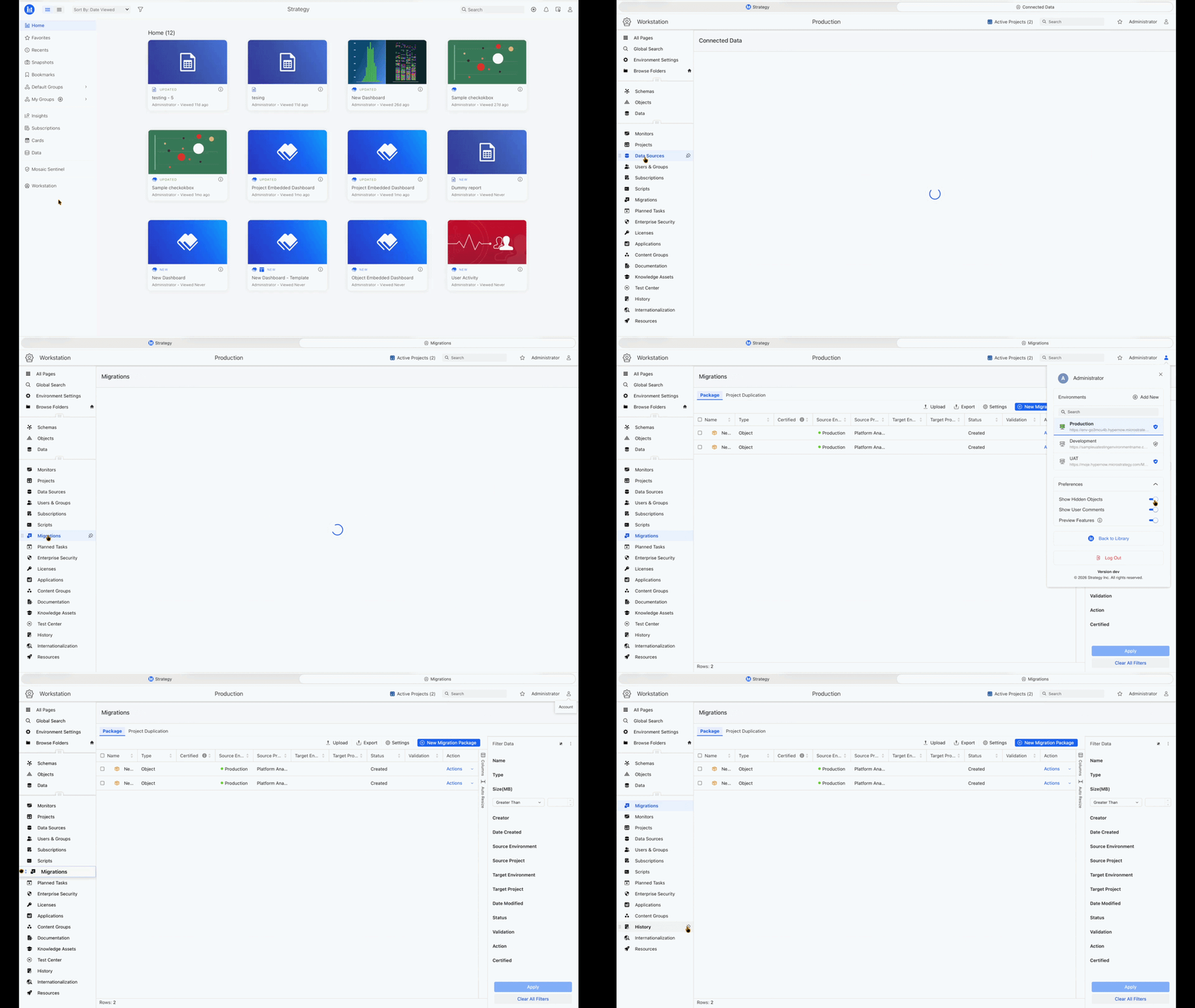
For teams with mixed operating systems, distributed administrators, or locked-down endpoints, browser-based Workstation reduces the IT dependency around core administration and modeling work. Workstation is now available in one click from Library with no separate install, covering user management, schema design, data source configuration, and core administration workflows.
Because Workstation Web is part of the Strategy platform, teams can reduce desktop deployment overhead, avoid version conflicts, and get the latest capabilities through regular platform upgrades. Single-environment workflows are available now, with cross-environment migration support planned for later this year.
Modernize Command Manager Scripts with Python
Many administrators have years of automation built in Command Manager, covering deployments, security, maintenance, and routine platform administration. As teams move toward Python and Workstation-based automation, rewriting those scripts manually can be time-consuming and risky.
The Command Manager to mstrio-py Migration Assistant gives administrators a guided path forward. Teams can upload existing Command Manager scripts and generate reviewable Python workflows mapped to common mstrio-py administration tasks, then inspect, refine, and validate the output step by step.
The result is a safer transition from legacy scripting to modern, Strategy-supported Python automation. Organizations can preserve existing automation investments, lower operational risk, and modernize at a manageable pace ahead of Command Manager deprecation.
Enterprise-Grade Tenant Isolation
For software providers, OEM use cases, or enterprises managing analytics across separate business units, tenant isolation has often meant separate deployments, duplicated administration, and higher operating overhead.
Multiple tenants can now run inside a single Strategy environment while keeping content, users, projects, and administration separated by design. For organizations managing multiple business units or OEM deployments, this reduces the need for separate environments while preserving tenant-level control and separation.
Financial Row Sets for Modern Grid
Finance teams building P&L statements, balance sheets, and cash flow reports often need to combine multiple row sets with different filters, aggregations, and formatting in one view. Until now, that often meant exporting to Excel or forcing complex statements into a single grid structure.
With Financial Row Sets, authors can stack multiple row sets in a single Modern Grid, each with its own dataset, filters, headers, subtotals, and formatting, while sharing the same columns across the full view. The result is cleaner financial reporting directly in Strategy, with support for drill-through and export to PDF or Excel.
Personal Views from Strategy Web Now Open in Library
Users who save Personal Views in Strategy Web with specific filters, prompts, and layout changes have had to return to Web to access those views with their settings applied, creating a split workflow between two surfaces.
Personal View subscriptions created in Strategy Web now open directly from the Library Subscriptions panel with all saved preferences automatically applied. Users can save any view as a Library bookmark from there. Personal Views are not deleted automatically, so teams can move at their own pace, and the surface-switching friction that slows Library adoption for teams with existing Web workflows goes away.
Deliver Subscription Content to Google Drive
Teams using Google Workspace as their daily environment should receive scheduled analytics content where they already work, not as attachments they must download and relocate.
Administrators can configure Google Drive as a subscription delivery destination in Workstation, with control over destination folders, recipient routing, and output format including Google Sheets, Excel, CSV, and HTML. Business users can subscribe to any dashboard or report from Library and have it delivered automatically to their personal Google Drive as a Google Sheets file on whatever schedule they choose. Delivery runs within existing Strategy access controls, without creating a parallel data path outside the platform.
That removes a manual export step and keeps trusted analytics inside the workflow for teams already working in Google Workspace.
June 2026 makes the semantic layer more operational: models that reflect real business cycles, cloud spend that is visible at the model level, and trusted context delivered to AI agents, financial reporting, Google Workspace, and browser-based workflows.
Learn more about these June updates on our What's New page and product documentation.
Frequently Asked Questions
What is included in the Strategy Software June 2026 release?
Strategy Software's June 2026 release focuses on smarter cost control, more flexible Mosaic modeling, and governed AI access. Highlights include Sentinel Cost Intelligence, flexible joins across Mosaic Models and Mosaic Schema, reusable agent prompts and instructions, Model Context Protocol support for Multi-Table Data Import and Intelligent Cubes, custom calendars, granular AI auto modeling controls, custom USL column naming, Financial Row Sets for Modern Grid, Google Drive subscription delivery, Workstation Web, Command Manager to Python migration, Personal Views in Library, and enterprise-grade tenant isolation.
How does Sentinel Cost Intelligence work with Snowflake and Databricks?
Sentinel Cost Intelligence connects to billing data sources in Workstation and applies query tagging so data platform spend can be attributed back to governed analytics assets. Starting with Snowflake and Databricks, Sentinel refreshes cost insights daily and highlights top cost drivers in a dedicated Cost Intelligence view. It also surfaces AI-powered recommendations, such as unloading inactive datasets, adjusting refresh cadences, or switching between live and in-memory modes when usage patterns justify it. Administrators can use these recommendations to prioritize optimization actions without exporting data to a separate cost management tool.
How do reusable prompts and instructions improve Strategy Agents?
Strategy Agents now make it easier to reuse setup work across agents. Creators can import and export column descriptions and custom instructions, then use a prompt library to add up to 25 reusable prompts for common business questions. This helps teams build agents faster, standardize behavior across business domains, and give business users one-click access to recurring analytical questions. For more complex questions, agents can try multiple reasoning paths before responding, improving consistency and reliability.
What does Model Context Protocol support for MTDI and Intelligent Cubes enable?
Model Context Protocol, or MCP, support for Multi-Table Data Import, or MTDI, and Intelligent Cubes lets MCP-compatible AI applications discover available projects and cubes, retrieve semantic descriptions, and run semantic queries against in-memory and live analytical data through the Mosaic endpoint. The same security policies and audit controls that govern human analytics users apply to AI agents. This helps teams extend AI workflows into operational analytics using governed data assets they already own, without exposing raw schemas or rebuilding the semantic layer for each new AI tool.
How does custom calendar support in Mosaic models work?
Custom calendar support lets architects upload a CSV that defines the dates, weeks, months, quarters, and years that match the organization's actual business calendar. Mosaic validates the structure, checks that periods are consecutive, and creates familiar time attributes with ISO-style display formats. This helps organizations model fiscal calendars, retail 4-4-5 calendars, academic calendars, and other non-standard calendar structures directly in Mosaic. Reports and dashboards built on those models reflect the calendar the business actually uses, reducing manual date logic and calendar workarounds.
What does flexible join control change for Mosaic modeling?
Flexible join control lets modelers define attribute-level join behavior in Mosaic Models and Mosaic Schema, formerly Project Schema. Modelers can choose from four options: matched records only, all lookup values, all fact or relationship records, or all records regardless of match. This makes it easier to show customers with no orders, stores with no transactions, borrowers with no current activity, or other business entities where related activity is missing. The result is more complete analysis that reflects the full business population, not just the records with matching fact data.
What are granular controls for Mosaic AI Auto Modeling?
Granular controls for Mosaic AI Auto Modeling let data teams decide which AI-assisted modeling behaviors are applied automatically and which remain suggestions for review. Teams can control AI naming, automatic attribute linking, automatic column merging, and multi-form attribute creation at the model level. This gives teams the speed of AI-assisted modeling while preserving the governance predictability required in production environments. Original column names can be preserved, and AI-generated suggestions can be reviewed before being applied.
What does custom column naming for Mosaic Models enable?
Custom column naming lets modelers define clearer column names for Mosaic Models exposed through the Universal Semantic Layer. Attribute forms and metrics can use aliases from the underlying data source as their USL column names, with fallbacks when aliases are blank or unsuitable. This matters as MCP clients, Power BI, SQL tools, and AI applications connect to Mosaic. Cleaner, business-friendly column names reduce confusion for analysts and give AI tools more useful context than raw source-system names.
What else is included in the June 2026 release for delivery and administration?
Google Drive subscription delivery lets administrators route scheduled analytics content to specific Drive folders in Google Sheets, Excel, CSV, or HTML format. Business users can set up their own deliveries from Library on any schedule, within existing Strategy access controls. Personal Views created in Strategy Web now open directly from the Library Subscriptions panel with saved filters, prompts, and layout preferences applied. Users can save any view as a Library bookmark, and Personal Views are not deleted automatically so teams can move at their own pace. Enterprise-grade tenant isolation allows multiple business units or OEM customers to run within a single Strategy environment while keeping content, users, projects, and administration separated by design. This can reduce the need for separate environments while preserving tenant-level control and separation.
What is Workstation Web and who is it for?
Workstation Web brings core administration and modeling workflows into the browser. It is designed for teams with mixed operating systems, distributed administrators, or locked-down endpoints where installing a Windows desktop application creates friction. Administrators can launch Workstation Web from Library and manage workflows such as user management, schema design, data source configuration, and core administration tasks. Single-environment workflows are available now, with cross-environment migration support planned for later this year.
What does the Command Manager to Python Migration Assistant do?
The Command Manager to mstrio-py Migration Assistant helps administrators move legacy Command Manager automation into modern, Strategy-supported Python workflows. Teams can upload existing Command Manager scripts, generate reviewable Python workflows mapped to common mstrio-py administration tasks, and validate the output step by step. This helps preserve existing automation investments, lower operational risk, and modernize at a manageable pace ahead of Command Manager deprecation.
What are Financial Row Sets in Modern Grid?
Financial Row Sets let authors stack multiple row sets in a single Modern Grid, each with its own dataset, filters, headers, subtotals, banding, and formatting while sharing the same columns across the full view. This makes it easier to build financial statements such as P&L reports, balance sheets, and cash flow reports directly in Strategy. Finance teams can create cleaner financial reporting views with support for drill-through and export to PDF or Excel, reducing the need to rebuild complex statements outside the platform.

Henry Guo
Henry Guo is Director of Outbound Product Management at Strategy, driving go-to-market and turning customer insights into discovery and validation for its semantic layer and AI products. With 15+ years in AI, data and security, he helps ship trusted secure enterprise platforms with measurable value.
Related posts
Strategy’s May 2026 release introduces Databricks Unity Catalog metadata integration for Strategy Mosaic, GDPR-aligned telemetry anonymization, SQL transaction forms in Library Web dashboards, and customizable global legends to strengthen governed analytics and AI workflows.
Henry Guo
May 15, 2026
Strategy Software's April 2026 updates introduce Save As for Mosaic models, filter carry-through for linked dashboards, Google Sheets export from Strategy Library, and full HyperIntelligence Card authoring in the browser.
Henry Guo
April 17, 2026
Discover the March 2026 updates that enhance your semantic layer control and integration with AI tools, featuring Mosaic Model Versioning with GitHub, built-in time intelligence, and smarter content discovery for faster, more reliable insights across your organization.
Henry Guo
March 20, 2026
Discover the February 2026 release, enhancing AI and BI workflows with trusted AI experiences, faster Auto Voice, and reliable delivery. Join us at Strategy World 2026 in Las Vegas to explore these innovations through live demos and sessions.
Henry Guo
February 13, 2026