

Products
Solutions
Ecosystems
Resources
Partners
April 2026: Strategy Software Makes Governed Analytics Safer to Change, Easier to Navigate, and More Browser-Ready
Quick Answer
Strategy Software's April 2026 release helps teams make safer changes to a live Mosaic model, preserve context as users move between related dashboards, and complete more governed analytics workflows in Library Web, including HyperIntelligence Card authoring, file subscriptions, and export to Google Sheets.
Trusted analytics only creates value when teams can update it safely, stay in context while using it, and move it into the workflows where decisions happen. This month's updates focus on those three needs across modeling, dashboard navigation, and browser-based delivery.
This month's highlights include Save As for Mosaic models, configurable date range limits for prompts, filter carry-through to linked dashboards, advanced banding in Modern Grid, browser-based HyperIntelligence Card authoring, file subscriptions in Library Web, and direct export to Google Sheets.
Work faster without breaking things
Save As for Mosaic Models
Changing a live semantic model puts every downstream dashboard and report at risk. Teams need a way to test and evolve models without touching what is already in production.
Model authors can now use Save As from the actions menu to create a named copy of any Mosaic Model, specifying a new name, description, and destination folder. The original stays intact, while the duplicate starts with fresh history and sharing settings.
Teams can branch, experiment, and version model work faster without disrupting the dashboards and reports that depend on what is already in production.

Stay in flow as you analyze
These updates help analysis move faster and more smoothly by keeping prompts in bounds, preserving context across dashboards, and making dense data easier to scan accurately.
Configurable Date Range Limits for Prompts
Unconstrained date range prompts are a quiet performance problem. A multi-year selection on a report built for monthly analysis generates disproportionate query load and slow responses for everyone on the system.
Administrators can now set a maximum allowed date range for attribute qualification prompts, such as 30 or 90 days, based on the needs of the application. If a user selects a range outside that limit, the system blocks the selection and explains why.
That helps control data volume, protect performance, and keep users focused on the analytical scope that matters.
Filter Selections Carry Through to Linked Dashboards
Contextual linking between dashboards breaks down at one predictable point: users set filters on a source dashboard, click through to a related view, and are immediately asked to re-enter the same values. The analytical thread breaks at the boundary.
Filter selections from the source dashboard now map automatically to the corresponding prompts on the target dashboard through contextual links. Administrators configure the mappings once, and users can move between related views without reselecting values or losing their place.
That preserves analytical context, reduces repetitive steps, and makes navigation feel more seamless and accurate.
Advanced Banding Options for Modern Grid
Dense grids are hard to scan quickly, especially when users are comparing values across many rows and columns.
Modern Grid now supports configurable color banding for both rows and columns, including custom band colors and the option to band by row or column headers, bringing it closer to the flexibility of traditional Reports.
The result is easier scanning, clearer visual separation, and faster comparison in dense operational or financial grids.
Do more from the browser
Three workflows that once depended on desktop tools can now be handled in Library Web, making governed analytics easier to manage in browser-first, cloud-oriented environments.
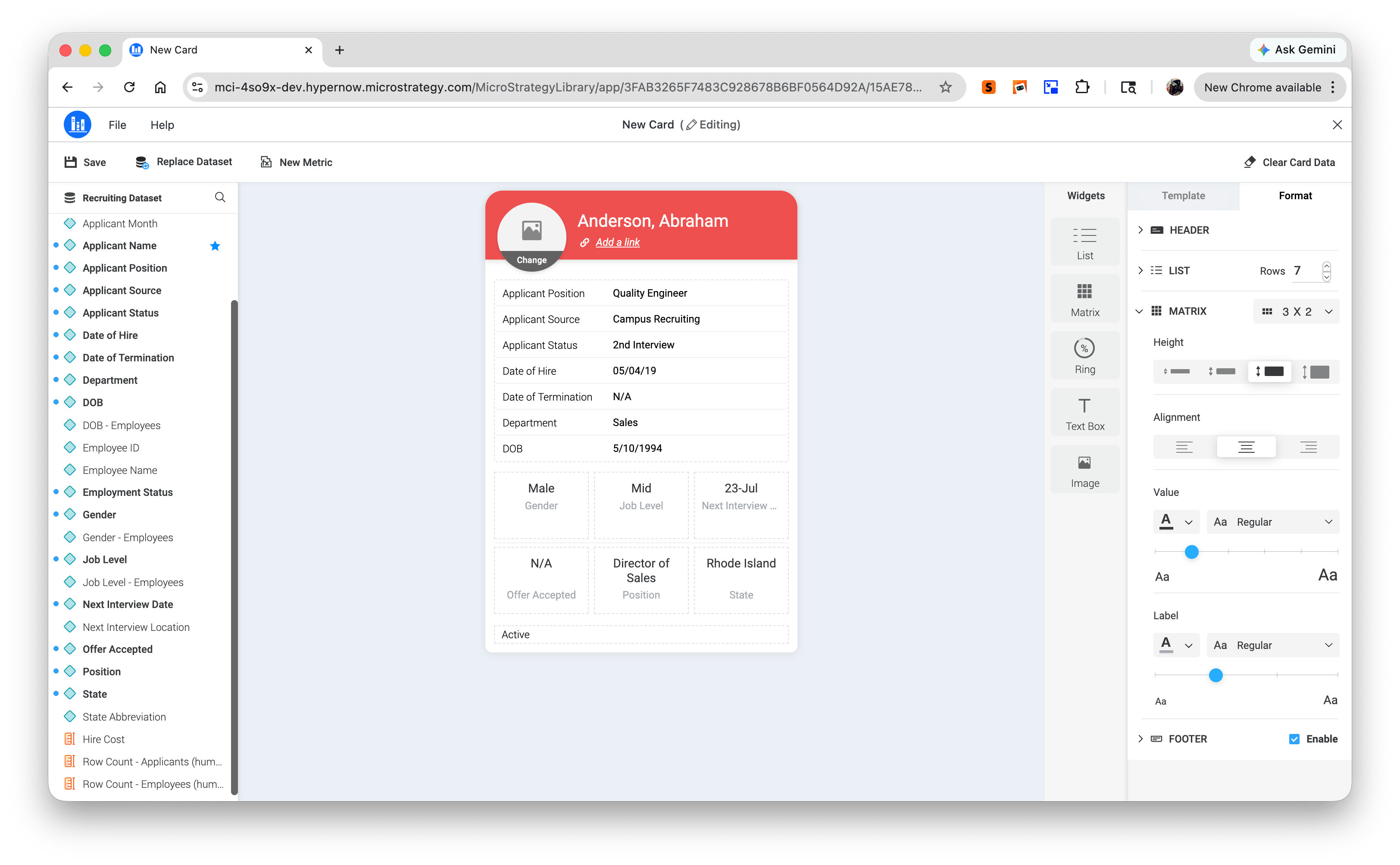
HyperIntelligence Card Creation and Editing in Library Web
HyperIntelligence Cards surface governed metrics inside the applications where business users already work. Building and maintaining those cards required the desktop client, slowing adoption for browser-first teams.
Teams can now author, edit, manage card assets, certify, and publish HyperIntelligence Cards entirely in Library Web, starting from the New menu alongside other governed content. Cards can also be linked to AI Agents and embedded across applications.
That removes a desktop dependency, expands self-service access, and makes it easier to deliver governed insights in context.
File Subscriptions Now Available in Library Web
Scheduling Excel, CSV, or PDF deliveries has required going outside Library to manage it, creating an unnecessary dependency on administrators for what should be a self-service workflow.
Library Web now handles the full file subscription lifecycle. Users can create, edit, monitor, and delete subscriptions for dashboards and reports directly in the browser.
Output format options include Excel, CSV, and PDF, with support for scheduling recurring deliveries to selected folders or recipients.
That turns routine report distribution into a simpler self-service workflow and reduces dependency on administrator support.
Export to Google Sheets from Library
A large share of planning, budgeting, and operational collaboration happens inside Google Workspace. Governed analytics only influences those decisions when it flows into those tools without friction.
Dashboards and reports in Strategy Library can now be exported directly to Google Sheets and saved to a user's personal Google Drive as structured spreadsheets for further analysis, sharing, or operational use. Designers and administrators can also define default export behavior at the dashboard and application level to keep formatting and structure consistent across teams.
That makes it easier to move governed analytics into the Google Workspace workflows where planning and collaboration already happen.
Taken together, the April 2026 updates make governed analytics easier to evolve, easier to navigate, and easier to use in day-to-day work. Teams can change models more safely, move through analysis with less friction, and handle more delivery and action from the browser. That means less operational overhead around trusted data and a faster path from insight to decision.
Learn more about these April updates on our What's New page and product documentation.
Frequently Asked Questions
How do I copy a Strategy Mosaic model without changing the one in production?
The Save As feature in Strategy Mosaic lets model authors create a named copy of any Mosaic model from the actions menu. The original model remains unchanged, and the copy starts with fresh history and sharing settings, so teams can experiment, branch, or version model work without affecting the dashboards and reports that depend on the live model.
Can I export Strategy Library dashboards to Google Sheets?
Yes. Strategy Library now supports direct export to Google Sheets, saving reports as structured spreadsheets to a user's personal Google Drive. Administrators and designers can also set default export behavior at the dashboard or application level for consistent formatting across teams.
How do I prevent users from selecting excessive date ranges in prompts?
Administrators can set a maximum allowed date range for attribute qualification prompts, for example limiting selections to 30 or 90 days. When a user selects a range that exceeds the configured limit, the system blocks the selection and explains the constraint, helping control query volume and protect performance.
Can I manage file subscriptions and scheduled report delivery in Strategy Library?
Yes. Library now supports the full file subscription lifecycle: creating, editing, monitoring, and deleting subscriptions for dashboards and reports directly in the browser. Supported output formats include Excel, CSV, and PDF, with recurring delivery scheduling included.
Can I create HyperIntelligence Cards in Strategy Library without the desktop client?
Yes. Strategy now supports full HyperIntelligence Card authoring, editing, asset management, certification, and publishing in Library. Cards can be started from the New menu, linked to AI Agents, and embedded across applications. No desktop client required.
Does Strategy carry filter context when navigating between linked dashboards?
Yes, with administrator configuration. The contextual linking feature maps filter selections from a source dashboard to corresponding prompts on the target dashboard automatically. Administrators configure the mappings once, and users navigate between related views without re-entering values or losing analytical context.

Henry Guo
Henry Guo is Director of Outbound Product Management at Strategy, driving go-to-market and turning customer insights into discovery and validation for its semantic layer and AI products. With 15+ years in AI, data and security, he helps ship trusted secure enterprise platforms with measurable value.
Related posts
Discover the March 2026 updates that enhance your semantic layer control and integration with AI tools, featuring Mosaic Model Versioning with GitHub, built-in time intelligence, and smarter content discovery for faster, more reliable insights across your organization.
Henry Guo
March 20, 2026
Discover the February 2026 release, enhancing AI and BI workflows with trusted AI experiences, faster Auto Voice, and reliable delivery. Join us at Strategy World 2026 in Las Vegas to explore these innovations through live demos and sessions.
Henry Guo
February 13, 2026
Kickstart 2026 with Strategy's latest release, featuring enhanced AI, BI, and Mosaic tools designed to boost productivity, streamline workflows, and empower data-driven decisions with seamless integration and creative flexibility. Discover how unified AI, improved dashboards, and advanced data model linking can transform your team's efficiency and insight delivery.
Henry Guo
January 16, 2026
Discover how December 2025's AI-driven governance and contextual agents are transforming enterprise insights, with innovations like Mosaic Sentinel and full Developer parity enhancing analytics and platform modernization. Dive into the latest advancements to scale intelligence and streamline workflows across your organization.

Hannah Lim
December 12, 2025