

Products
Solutions
Ecosystems
Resources
Partners
May 2026: Consistent Governed Data, Less Compliance Work, and Actionable Dashboards
Quick Answer
Strategy's May 2026 release helps teams keep governed data consistent from source to semantic layer, automate GDPR-aligned telemetry anonymization, and turn dashboards into places where users can act on data. Updates include Databricks Unity Catalog metadata in Strategy Mosaic, GDPR-aligned anonymization for Platform Analytics telemetry, SQL transaction forms in Library Web, and customizable global legends. For organizations running transactional workflows in Report Services Documents, SQL transaction forms open a direct path to modernize those applications in Library Web.
For AI-powered workflows to produce reliable results, they need trusted context behind every answer: consistent source metadata, protected platform activity, and dashboards that connect insight to action. May 2026 focuses on exactly that.
This month's highlights include Databricks Unity Catalog metadata imported into Strategy Mosaic, native GDPR-aligned telemetry anonymization, SQL transaction forms in Library Web dashboards, and customizable global legends. Together, they reduce friction across governance, compliance, and dashboard workflows.
Keep governed data consistent from source to semantic layer
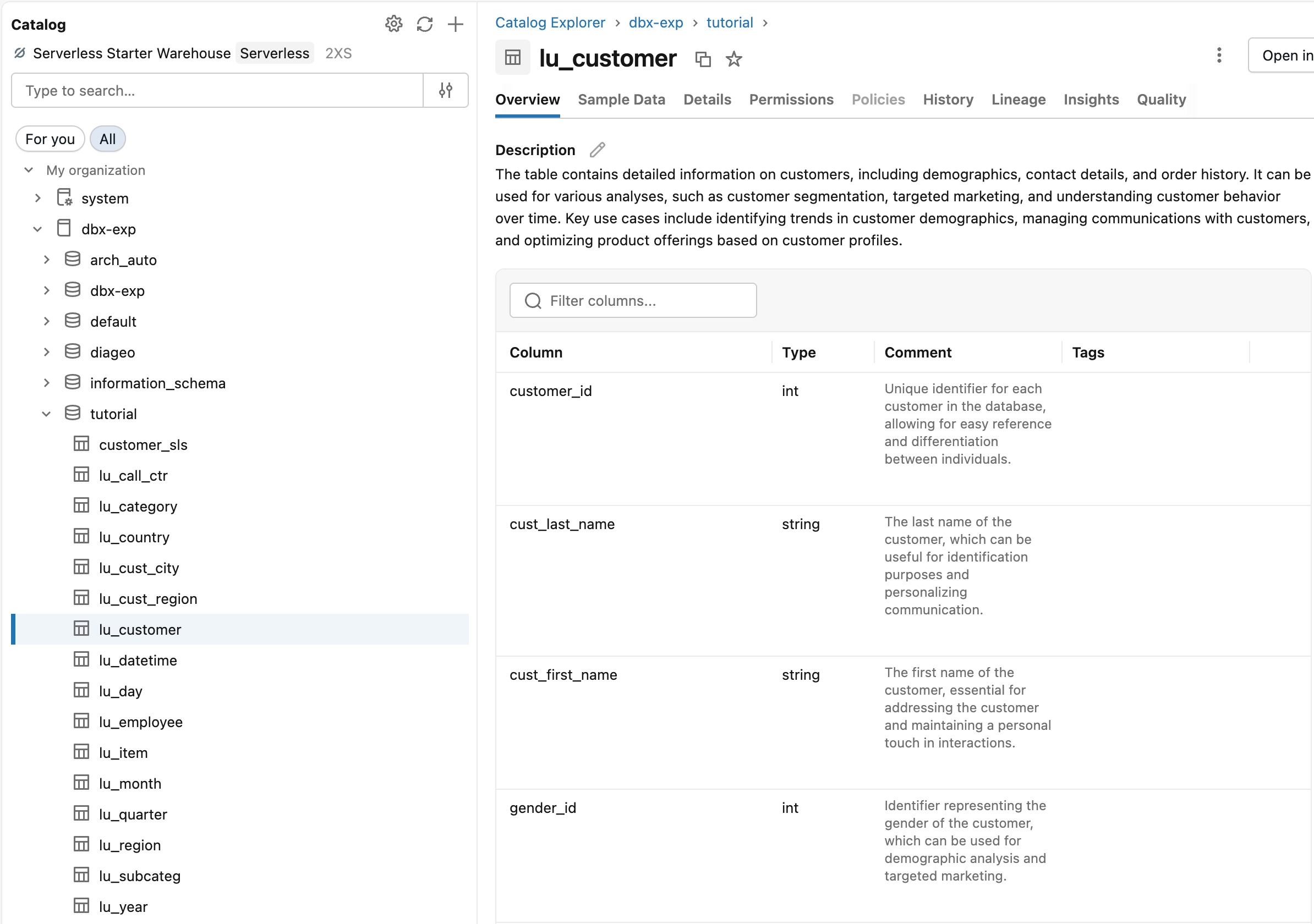
When column descriptions are defined in Databricks Unity Catalog, that context often needs to be recreated downstream before teams can use it in Mosaic. Re-entering descriptions manually creates two sources of truth that drift apart over time.
Databricks Unity Catalog Metadata in Mosaic
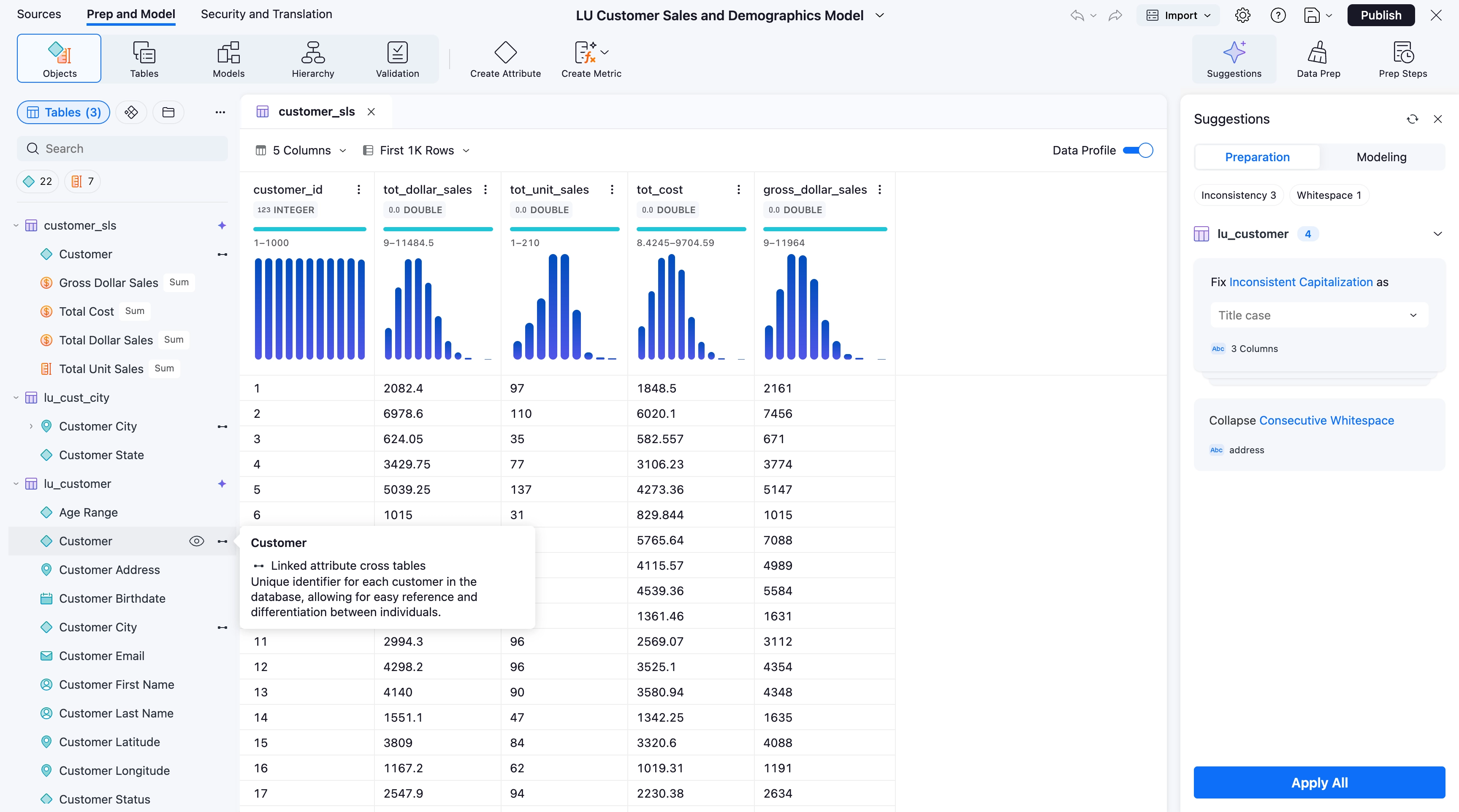
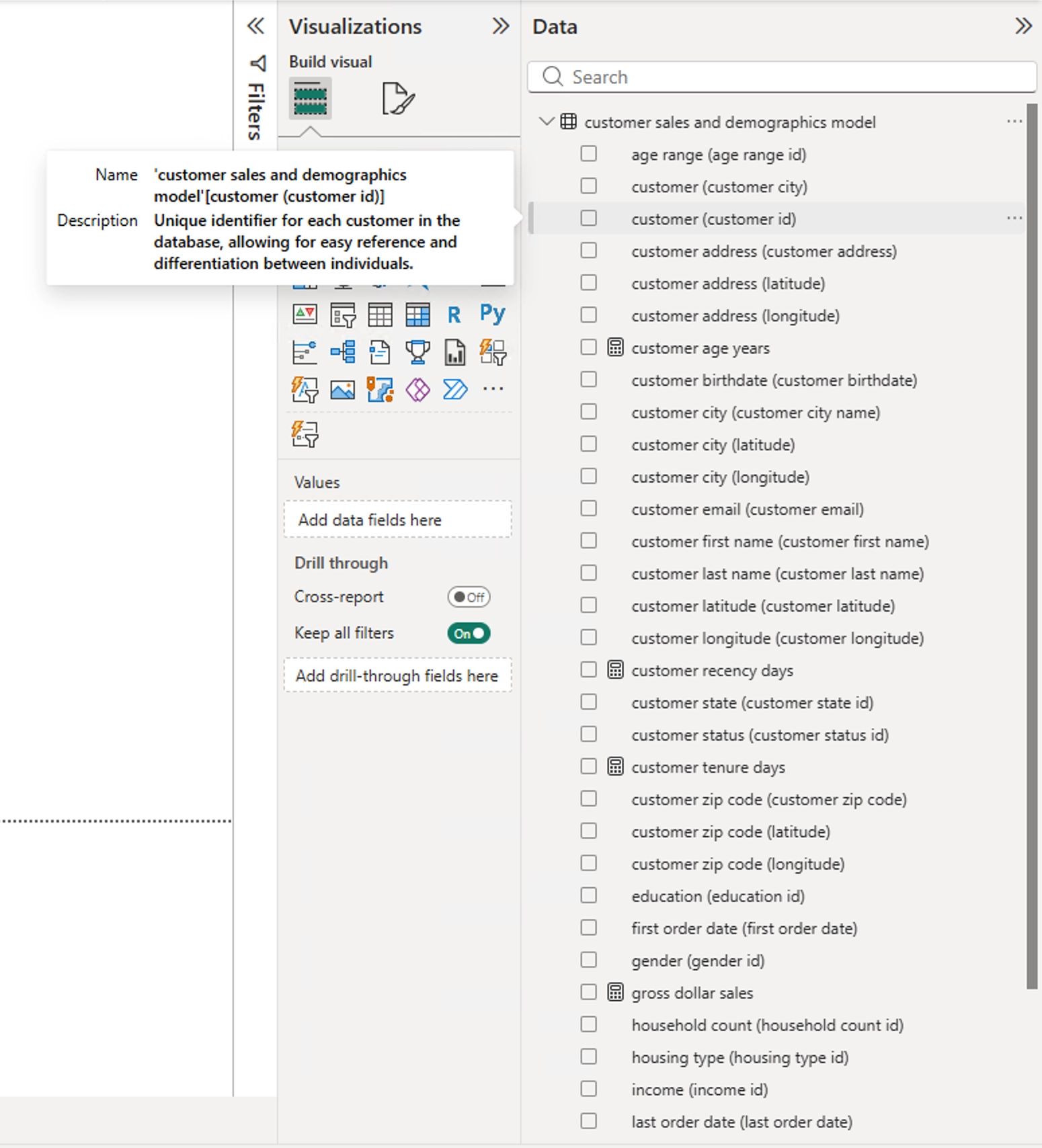
With this release, teams no longer need to re-enter Databricks column descriptions manually in Mosaic. Mosaic Studio now imports column comments from Databricks Unity Catalog as extended metadata, making those descriptions available for AI-assisted object creation and naming inside Mosaic Studio and for downstream semantic workflows and AI-assisted experiences.
The result is less duplicate metadata work and more consistent context across the source and semantic layer. For teams already maintaining column descriptions in Databricks Unity Catalog, the workflow becomes simpler: import those descriptions into Strategy Mosaic rather than re-entering them manually.
Automate compliance without manual cleanup
GDPR and related privacy requirements can require organizations to honor right-to-erasure requests across audit and telemetry logs. Organizations may need to remove personal identifiers while preserving activity history for audit and operational reporting. Anonymization helps balance both needs: user identity is removed while activity records are preserved. In many environments, achieving that balance has required custom SQL or manual processes that are slow, error-prone, and difficult to audit consistently.
Automated GDPR-Aligned Anonymization for Platform Analytics Telemetry
For Platform Analytics telemetry, this replaces the custom SQL or scripted processes many organizations have used to meet this requirement. After a configurable retention period, for example 90 days, personal identifiers are irreversibly removed from Platform Analytics telemetry records. Activity details used for compliance reporting and operational analysis are preserved; only the personal identifiers are removed. Administrators can run the process on a schedule through the REST API, with execution summaries available for monitoring of number of rows affected.
Telemetry anonymization moves from a manual cleanup task to a built-in platform process. The audit history stays intact while personal identifiers are removed.
Turn dashboards into places where work happens
A dashboard that shows what is happening is useful. A dashboard that lets users act on what they see delivers a different kind of value. This release makes dashboards more actionable and easier to use.
SQL Transaction Forms in Library Web Dashboards
SQL transaction forms bring transactional writeback capabilities to Library Web dashboards for the first time, giving organizations running Report Services Document (RSD)-based workflows a direct path to modernize those applications in Library Web. For all users, the value is direct: business users typically review analytics, then leave to record what they decided elsewhere, a handoff that introduces room for error.
SQL-based transaction forms close that gap. Dashboard authors drag and drop fields, map them to database columns, and add Submit and Cancel buttons directly in Library Web. Business users complete responsive, keyboard-accessible forms on web or mobile to add, update, or delete records in relational databases, handling orders, inspections, task logs, and approvals without leaving the Strategy experience.
The dashboard becomes part of the workflow, not just the place users review results.

Customizable Global Legends for Cleaner Dashboards
When multiple charts share the same dimensions, each chart carries its own legend. The same color key appears three, four, five times on a single page. Canvas space fills up with repeated context instead of more data. For dashboards with repeated dimensions such as region, product, customer segment, or time period, authors can replace multiple redundant legends with one shared control.
Authors can now detach legends from individual charts, position them anywhere on the page, and configure a single global legend to control multiple visualizations at once. Consumers click a legend item to filter or highlight data across several charts simultaneously. Exports, mobile views, and accessibility workflows all respect the configured layout. Less clutter, more signal, and a dashboard that is easier to read and reuse.
May 2026 is a focused release. Column descriptions from Databricks Unity Catalog become easier to reuse in Strategy Mosaic. Telemetry anonymization becomes a built-in platform process. Dashboards can capture actions and updates, not just display results, while becoming cleaner and easier to use. Together, these updates strengthen the governed context behind analytics and AI-assisted workflows.
Learn more on our What's New page, including documentation for Strategy Mosaic, Platform Analytics, and Library Web.
Frequently Asked Questions
What is included in Strategy's May 2026 release?
Strategy’s May 2026 release includes Databricks Unity Catalog metadata in Strategy Mosaic, GDPR-aligned telemetry anonymization for Platform Analytics, SQL transaction forms in Library Web dashboards, and customizable global legends.
Does Strategy Mosaic support Databricks Unity Catalog?
Yes. Mosaic Studio connects to Databricks environments and, as of May 2026, can import column-level metadata from Databricks Unity Catalog directly into Strategy Mosaic models. That keeps source-aligned context consistent across both platforms and makes metadata available for AI-assisted modeling and downstream semantic workflows through Strategy Mosaic.
How does Databricks Unity Catalog metadata integration work with Strategy Mosaic?
Mosaic Studio can now import column comments from Databricks Unity Catalog as extended metadata. Those descriptions are used for AI-assisted modeling and object naming inside Mosaic Studio, and can support downstream semantic workflows and AI-assisted experiences through Strategy Mosaic. That gives teams richer, source-aligned context in Strategy Mosaic without maintaining descriptions in two places.
What does GDPR telemetry anonymization do in the Strategy platform?
After a retention period you configure, for example 90 days, personal identifiers are irreversibly removed from Platform Analytics telemetry records. Activity details are preserved for operational and compliance reporting. Built-in system accounts are automatically excluded, so administrative activity is unaffected. The process runs on a schedule via REST API and returns execution summaries for monitoring. It is designed to help organizations in regulated industries support GDPR right-to-erasure workflows in Mosaic Cloud Environment (MCE) deployments through native platform controls, without custom SQL or manual cleanup.
How do SQL transaction forms in Library Web dashboards work?
Dashboard authors design forms in Library Web by dragging and dropping fields, mapping them to database columns, and adding Submit and Cancel buttons. Business users on web or mobile complete the form to add, update, or delete records in relational databases directly from the dashboard, without navigating to a separate application or workflow. For organizations migrating from Report Services Documents, this brings transactional form capabilities to Library Web dashboards for the first time.
Can SQL transaction forms replace transactional Report Services Documents in Library Web?
Yes. SQL transaction forms in Library Web dashboards bring writeback capabilities previously available only in Report Services Documents to the modern Library experience. Organizations running transactional workflows in RSDs can now rebuild those forms in Library Web dashboards, supporting their migration to the modern platform.
How do customizable global legends work across charts in Strategy dashboards?
Authors can now create a legend selector, position it freely on the page, and configure it to control multiple visualizations that share the same attributes. Consumers click legend items to filter or highlight data across several charts simultaneously. The layout persists in exports, mobile views, and accessibility workflows.

Henry Guo
Henry Guo is Director of Outbound Product Management at Strategy, driving go-to-market and turning customer insights into discovery and validation for its semantic layer and AI products. With 15+ years in AI, data and security, he helps ship trusted secure enterprise platforms with measurable value.
Related posts
Strategy Software's April 2026 updates introduce Save As for Mosaic models, filter carry-through for linked dashboards, Google Sheets export from Strategy Library, and full HyperIntelligence Card authoring in the browser.
Henry Guo
April 17, 2026
Discover the March 2026 updates that enhance your semantic layer control and integration with AI tools, featuring Mosaic Model Versioning with GitHub, built-in time intelligence, and smarter content discovery for faster, more reliable insights across your organization.
Henry Guo
March 20, 2026
Discover the February 2026 release, enhancing AI and BI workflows with trusted AI experiences, faster Auto Voice, and reliable delivery. Join us at Strategy World 2026 in Las Vegas to explore these innovations through live demos and sessions.
Henry Guo
February 13, 2026
Kickstart 2026 with Strategy's latest release, featuring enhanced AI, BI, and Mosaic tools designed to boost productivity, streamline workflows, and empower data-driven decisions with seamless integration and creative flexibility. Discover how unified AI, improved dashboards, and advanced data model linking can transform your team's efficiency and insight delivery.
Henry Guo
January 16, 2026